
1 x Go SRT
1 x On The Go Cap
1 x USB-C to USB-C Cord
1 x Go Glass Aroma Tube
1 x Go Mouthpiece
1 x Go WPA
1 x Go Shell
5 x Go Filter Screens
1 x Go Shell Grip
2 x Go Stem Caps
1 x Stainless Steel Stirring Tool
2 x Go PVC Travel Tube w./ Cap
1 x PVC Travel Tube w./ Cap (90mm)
1 x Cleaning Brush
1 x Operating Instructions
A [Action] Button
UP Button
DOWN Button
Power ON:
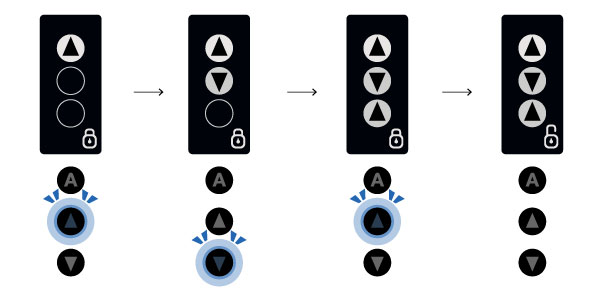
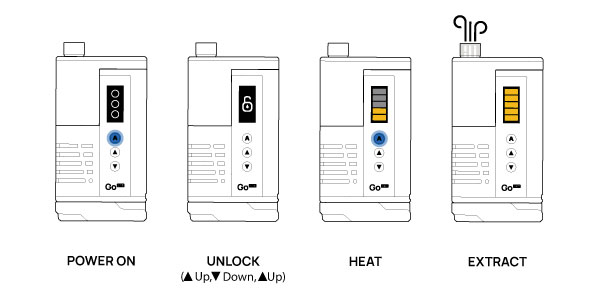
Press and hold the ACTION button for 3 seconds to power ON your Go SRT. Three circles will appear and you’ll be greeted with a friendly “Hi!” from Arizer.
IF lock is enabled press UP, DOWN, UP to unlock your Go SRT. A reference can be found on the base of your device.
Power OFF:
Press and hold the ACTION button for 3 seconds to power OFF your Go SRT.
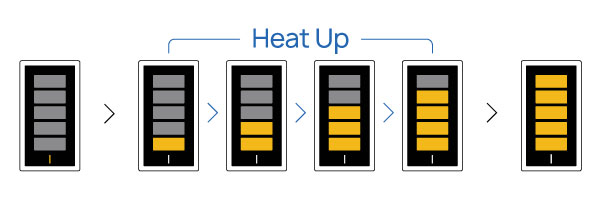
Press the ACTION button to start heating your Go SRT. The bars on the screen will light up progressively to indicate the
rising temperature. Once all bars have turned yellow, your device is heated and ready for use.
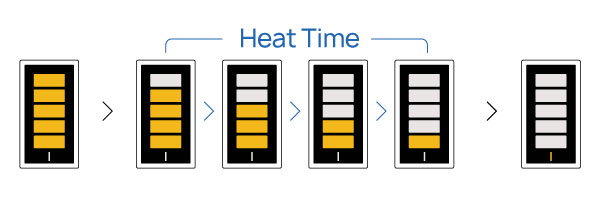
Heat Time is the duration your Go SRT maintains the preset temperature. During this period, the bars on the screen will turn white to indicate the remaining heat time.
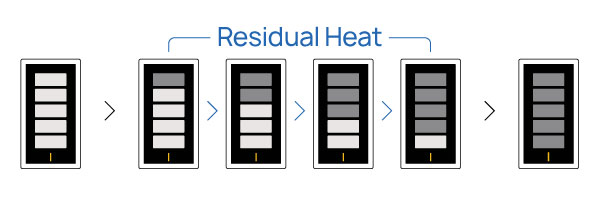
After HEAT TIME ends, make the most of your botanicals while residual heat in the oven tapers off.
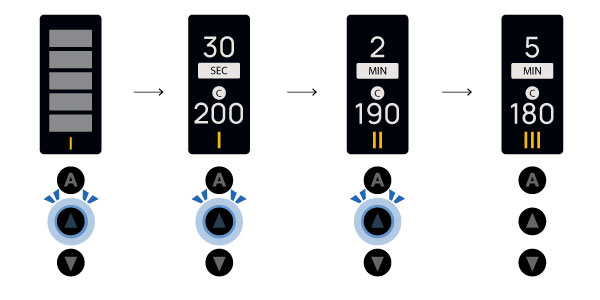
With the introduction of our new SRT Operating System, Arizer has curated three unique presets for you to enjoy. These presets are simply a starting point — you can edit, adjust, and fine-tune them to perfectly suit your preferences.
Switch Presets
Press the UP or DOWN button to preview and navigate your presets.
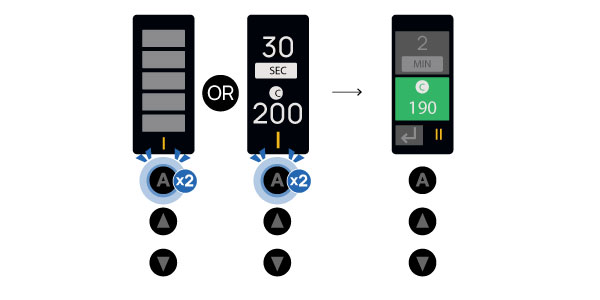
Preset Edit
Double-press the ACTION Button to edit your Presets.
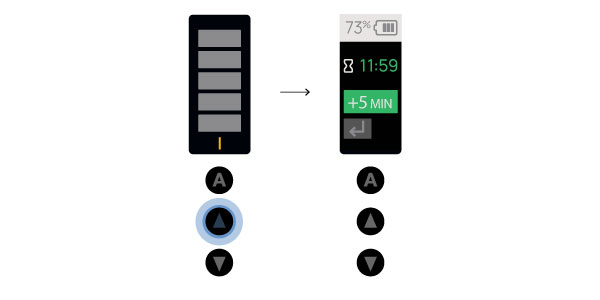
Press and Hold the UP button to access the Session Toggle to check battery percentage, view remaining Auto-Off time, and add more time to your session.
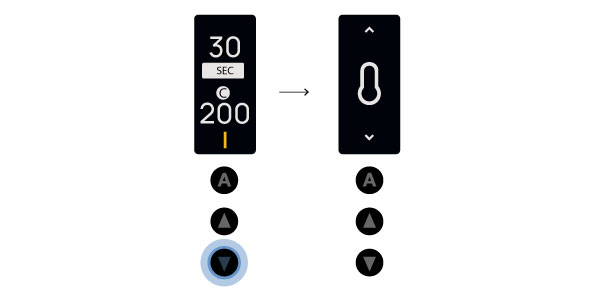
Press and hold the DOWN button to open the Settings menu. Navigate using the UP and DOWN buttons, and press the ACTION button to select.
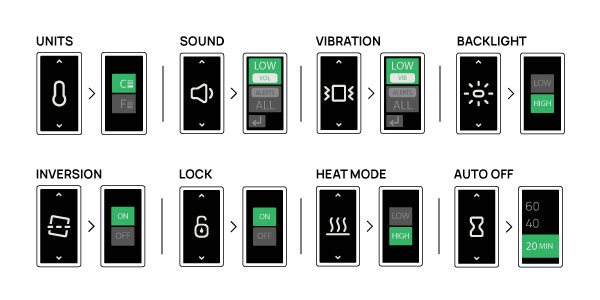
UNITS
The Go SRT can be set to Celsius or Fahrenheit.
SOUND
Adjust the volume (VOL) from Low to High and change your alert setting to All,
Temperature (TEMP) or Off.
VIBRATION
Adjust the vibration (VIB) from Low to High, and change your alert setting to All,
Temperature (TEMP) or Off.
BACKLIGHT
Adjust the display backlight between LOW, and HIGH.
INVERSION
Turn Control & Display Inversion feature On or Off.
LOCK
Turn the Go SRT Lock feature On or Off.
HEAT MODE
Heat Mode allows you to adjust oven power.
AUTO OFF
The automatic shut-off timer safety feature ensures you don’t forget to turn
off the your Go SRT and helps conserve battery life. Adjust between 20, 40
and 60 minutes.
BACK
Use back to exit from the settings menu.
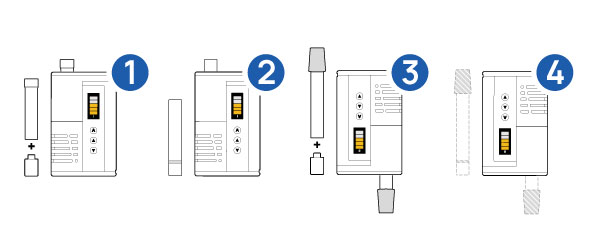
1 – Go Shells + Go Glass Mouthpiece
2 – Go Glass Aroma Tube
3 – Go Shells + Go WPA + Water Pipe/Bubbler
4 – Go Frosted Glass Aroma Tube + Water Pipe/Bubbler
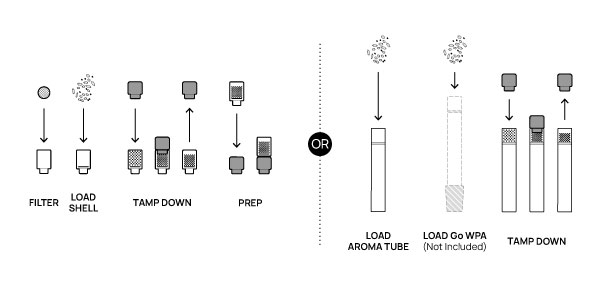
LOAD THE SHELL / GLASS AROMA TUBE: Place a filter in the large opening of your Go Shell, then add your choice of pre-ground or coarsely ground botanicals. For easiest loading, put botanicals in a small container and gently push and slightly twist the glass stem into the container to fill the dish. Do not press too hard or pack too tightly. This method takes advantage of the Shell’s design for easy maintenance and optimal performance.
Alternatively, you can load the chamber directly with pre-ground botanicals or finger-crumbled flower. For optimal convection heating and pure vapor, lightly tamp the botanicals, leaving a small gap (1–2 mm). PRO TIP: Preload multiple Shells and carry spare doses in the protective PVC Travel Tubes or in the Go Shell Case (sold separately).
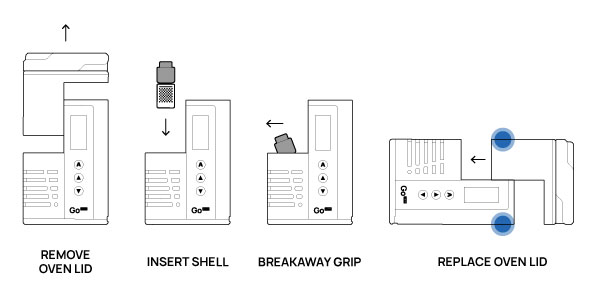
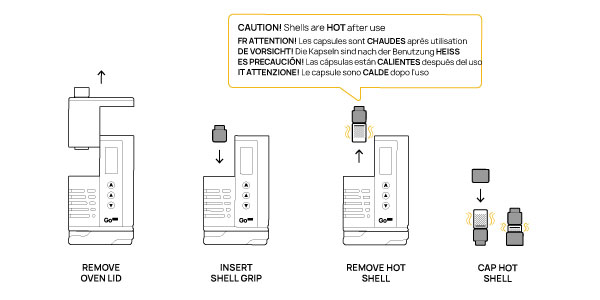
Remove the oven lid and place your loaded shell into the open chamber. To replace the oven lid, align the flat surface of the lid with the flat surface of the device, then apply gentle pressure to both the lid and the device, allowing the magnetic connection to smoothly lock the lid into place.
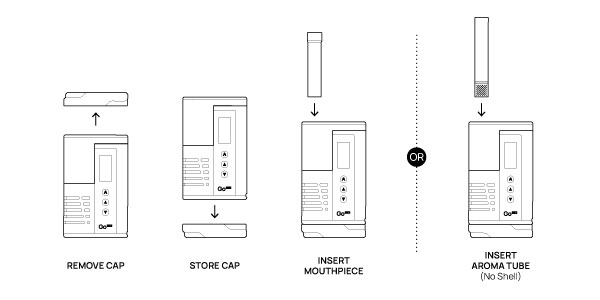
Remove the On The Go Cap and set it aside or attach it to the bottom of your device using the magnetic connection. Insert the Go Glass Mouthpiece or the Go Glass Aroma Tube (if you are not using a Go Shell).
Power on and unlock your Go SRT. To begin heating, press the ACTION button. Once all bars are fully yellow, the device will beep and vibrate twice to indicate that it’s ready for extraction.
See page 2 – 5 for detailed instructions.
Remove the oven lid and press the Go Shell Grip onto the exposed portion of the HOT shell. CAUTION: Shells are HOT after use. Let cool before handling OR carefully use Go Shell Grip + Cap to safely handle/remove HOT shells. Once the shell has been removed use a Stem Cap to secure your used shell for travel or storage.
Connect to your water pipe or bubbler using the included Frosted Go WPA. When the Go SRT is turned upside down with the Inversion setting turned ON, the display and controls automatically invert for convenient operation.
In cold conditions, the Go SRT can be used as a hand warmer by operating the device with no glass attachments installed and the top fully closed. Power on the unit, select a low temperature setting, and allow it to warm briefly. Once heated, hold it in your hands or place it in loose mitts or a coat pocket, keeping the air vents unobstructed for proper airflow. Keep the device clean and vents clear to ensure safe, consistent performance.
Add some coarsely ground aromatics to the top portion of your Go Glass Aroma Tube and insert the tube into your device. Use low range temperatures to release a pleasant aroma. Cleanse your palate by gently wafting beneath your nose.
1) Read Before Use
Read and follow this “READ BEFORE USE — Care, Safety, Warranty & Legal Information” booklet before charging or using the product. Failure to read and follow these instructions, or improper or careless use, may lead to personal injury, fire, explosion, property damage, or loss of use.
2) First Time Use
• Before first use, run a short burn-off cycle (without botanicals) in a well-ventilated area to help remove any residual manufacturing odors.
• Examine box contents to ensure all included parts are in good condition, not damaged from shipping.
• Check glass parts for cracking, chipping, or weakness before use.
• Packaging materials, bags, and small parts may pose a choking hazard. Keep out of reach from children, minors, and pets.
3) Cautions, Disclaimers & Warnings
**WARNING – Hot Parts & Glass parts**
Handle hot components and glass parts with care. Do not place hot parts on non-heat-safe surfaces. Attach the protective heat-rated silicone caps and grips to cover the hot ends of glass parts. Allow the heating unit and parts to cool completely before placing them in a purse, pocket, or any container where heat could cause damage.
Parts are made from strong, scientific-quality borosilicate glass; however, borosilicate glass can break if dropped or impacted. Avoid tapping glass parts on hard surfaces to help prevent cracking or breaking. Always carefully align and attach Oven Lid when using Go Shells as detailed in the Operating Instructions. If a glass part is dropped or sustains an impact, inspect it for cracks, chips, or weakness before further use. Do not expose hot glass parts to cold water or sudden/extreme temperature changes, as this may cause cracking or breaking.
Electrical / Fire / Shock Precautions
Product contains electrical and delicate parts — do not drop. If damaged, do not operate. To help protect against electric shock or fire:
• Never immerse or operate the product in or around water or other liquids.
• Do not stick or pour anything into the unit or place it near flammable material.
• Do not store, operate, or expose the unit and contents to extreme temperatures.
• Do not open the unit unless authorized by Arizer — doing so may cause electric shock and voids the warranty.
• Do not leave the unit unattended while turned on or charging.
For additional charging and battery precautions, see Battery Safety Overview.
Intended Use and Information Disclaimer
IMPORTANT: Obey local laws and regulations. Not all botanicals are legal for use in every Country or State. This product is intended for legal use only as described in the Operating Instructions and for no other purpose.
NOT FOR USE WITH E-LIQUIDS, TOBACCO, OR TOBACCO PRODUCTS
The information herein and in the Operating Instructions is provided for instructional and cautionary purposes only. It is intended to assist in understanding general theories and practices related to preparation and use, and does not constitute an endorsement of any use or preparation method, nor a guarantee of any results or effectiveness.
Nothing in these documents is intended to replace or supersede professional consultations. This product is not licensed as a medical device, and nothing in these documents is intended as medical or prescriptive guidance or for diagnosing or treating any health problem, condition, or disease. It is the user’s responsibility to consult a physician or other qualified medical professional as appropriate. Use this product only as intended.
4) Battery Safety Overview
Lithium‑ion batteries are volatile high‑energy components. Failure to follow these instructions may result in fire, explosion, personal injury, or property damage. The device has built‑in protections for over‑charging and over‑discharging, but safe charging, handling, and storage are still required.
Battery Performance & Charging
• With normal use, Go SRT batteries will last for hundreds of charge cycles before noticeable capacity loss
• Typical runtime is about 1 hour per fill charge, depending on temperature setting, environment, and battery age.
• Fully charge before first use. A full charge usually takes about 1–3 hours, depending on the charger and whether the device is used while charging.
Charging & Safety Guidelines
Eco Charging
To optimize battery longevity, your device includes an Eco Charging feature. By default, the device will charge up to 80% and then stop charging. If you want to charge to 100%, press and hold the UP button while the device is connected to power to enable full charging.
Temperature Protection
Charging may pause temporarily if the device is too hot or too cold.
LOW TEMP HOLD: Displayed below 3°C (37°F). Charging resumes above 3°C (37°F).
HIGH TEMP HOLD: Displayed above 48°C (118°F). Charging resumes once the device cools.
The Go SRT includes a USB‑C cable and is designed for USB‑C Power Delivery (USB‑C PD) charging. When charging:
• Do not charge unattended.
• Charge at room temperature on a hard, stable, visible surface.
• Do not charge or store on soft surfaces (beds, couches, pillows, carpets) or in confined spaces (drawers, bags, under blankets).
• Keep away from water sources (sinks, bathtubs, showers, wet areas).
• Use the supplied Arizer USB‑C cable, or a high‑quality certified USB‑C cable from a reputable brand.
• Use a certified, high-quality USB-C PD charger from a reputable brand; do not use counterfeit or unbranded adapters.
• Avoid leaving the device plugged in at 100% charge for long periods, as this can shorten the battery life.
• Do not charge if the device, cable, or adapter appears damaged.
• If the device or charger becomes unusually hot while charging, unplug immediately and discontinue use.
Use While Charging
If the battery is low, you can partially charge (about 5-10 minutes) and then use the Go SRT while charging. Note: The device will not operate if the battery is too low; a minimum charge level is required to operate. IMPORTANT: Follow all Charging & Safety Guidelines.
Care, Handling & Storage
To maintain and extend battery life:
• Handle the device and battery with care
• Do not drop, crush, puncture, disassemble, or tamper with the device or battery.
• Do not remove or damage the battery’s protective wrap; never use a battery with torn or loose wrap.
• Use and store the Go SRT in a cool, dry, well-ventilated place.
• Avoid extreme heat or cold, high humidity, and prolonged direct sunlight.
• Do not expose the device or battery to water or other liquids.
• Avoid frequent discharges to LOW; recharge often.
• For storage longer than one month, do not leave the battery fully charged or fully drained; store at around 50% charge.
If the Device or Battery is Dropped, Damaged, or Overheating
If you drop the device, see damage, or notice abnormal behavior (i.e. unusual heat, hissing, or odors):
• Stop using the device immediately.
• If it is safe to do so and the device is not extremely hot, place it on a non-flammable surface (large ceramic plate, metal tray, concrete floor) away from anything that could melt or burn, and monitor it.
If the device is very hot, smoking, or venting, or you suspect a fire risk:
• Do not pick up or move the device.
• Keep people, pets, and flammable materials away.
• Follow local fire safety procedures and contact emergency services if there is any risk to people or property.
If the device or battery has overheated, vented, or been involved in a fire, do not use it again; contact Arizer Support or dispose of it according to local regulations.
If the device is dropped or scuffed but shows no excess heat or abnormal behavior:
• Place it in a safe, dry place for at least one hour and confirm it does not overheat.
• If any abnormal signs appear, follow the guidance above and discontinue use.
• If no issues appear, you may continue to use the device, but monitor it during later use and charging.
Battery Replacement & Disposal
The Go SRT Battery is a high-capacity, long-life component and is covered under a limited 1-year warranty. For safe replacement using official Go SRT Batteries, email service@arizer.com or visit www.arizer.com/gosrt/battery for instructions. Do NOT attempt battery replacement with non-official parts or by methods not approved/authorized by Arizer. Only official Go SRT Batteries are approved for use with the Go SRT. Using non-official or counterfeit batteries, or ignoring the safety information provided may result in fire, explosion, injury, or property damage and is not covered under warranty.
Do not dispose of the Go SRT Batteries in household trash:
• Follow local regulations for recycling and disposal of batteries and electronic devices.
• Use designated battery recycling, e-waste, or hazardous collection points where available.
• If unsure, contact your local waste authority or Arizer Support for guidance.
♻️ Please recycle responsibly according to local regulations.
5) Limitation of liability
Arizer and its affiliated companies are not liable for any injury, loss, or damage arising from, including but not limited to:
• Use of non‑official or counterfeit batteries, or batteries not specifically approved for the Go SRT.
• Use of counterfeit, low‑quality, or otherwise unsafe chargers, cables, or accessories, or use of chargers or accessories in a way that does not follow the Operating Instructions.
• Dropping, crushing, puncturing, disassembling, modifying, or tampering with the device, battery, glass parts, or accessories, or attempting unauthorized repairs or service.
• Operating, charging, or storing the device or battery outside the specified environmental conditions, or exposing them to liquids, fire, extreme temperatures, impact, or other physical abuse.
• Failure to follow cleaning, handling, storage, and battery safety instructions, or failure to follow local fire and safety regulations.
• Use of the device with botanicals, essential oils, or other substances not described in the Owner’s Manual, or use of the device or botanicals in violation of local laws and regulations.
• Injuries or damage resulting from broken glass parts or from contact with hot parts or surfaces of the device or accessories.
By purchasing and/or using this product, buyer/user assumes all risks associated with lithium-ion batteries and with the use of this device. To the maximum extent permitted by applicable law, Arizer’s total liability for damages in connection with the product and its parts shall not exceed the purchase price of the product.
6) Product Certifications
Equipped for worldwide use with an input capacity of 110-240V and international certifications:
 — Indicates conformity with applicable EU requirements.
 — Indicates compliance with applicable U.S. FCC requirements.
 — Indicates conformity with applicable UK requirements.
 — Indicates compliance with applicable restrictions on hazardous substances.
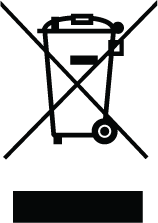 — Do not dispose of with household waste; use appropriate collection/recycling.
 — Keep dry. Protect from liquid, moisture, and high humidity.
 — Recycle packaging where facilities exist.
WEEE disposal (EU)
• Do not dispose of this product with household waste.
• Use appropriate local collection, return, or recycling programs for electrical/electronic equipment.
• Follow applicable local requirements for battery and electronic waste disposal.
Regulatory statements
United States — FCC (Class B digital device)
Note: This equipment has been tested and found to comply with the limits for a Class B digital device, pursuant to Part 15 of the FCC Rules. These limits are designed to provide reasonable protection against harmful interference in a residential installation. This equipment generates, uses and can radiate radio frequency energy and, if not installed and used in accordance with the instructions, may cause harmful interference to radio communications . However, there is no guarantee that interference will not occur in a particular installation. If this equipment does cause harmful interference to radio or television reception, which can be determined by turning the equipment off and on, the user is encouraged to try to correct the interference by one or more of the following measures:
• Reorient or relocate the receiving antenna. Increase the separation between the equipment and receiver.
• Connect the equipment into an outlet on a circuit different from that to which the receiver is connected.
• Consult the dealer or an experienced radio/TV technician for help.
Caution: Changes or modifications not expressly approved by the party responsible for compliance could void the user’s authority to operate the equipment.
Canada — ICES-003 / NMB-003 (Class B)
This Class B digital apparatus complies with Canadian ICES-003. Cet appareil numérique de la classe B est conforme à la norme NMB-003 du Canada.
7) Cleaning & Maintenance
The Go SRT is designed to be essentially maintenance-free, allowing you to spend more time using it and less time cleaning. Simply recharge the battery when it’s low, swap pre-loaded Go Shells or Go Glass Aroma Tubes as needed, brush any debris from the oven after use (once device has cooled to room temperature), and periodically clean the glass components to maintain optimal flavor and performance. To clean the glass parts, soak them in isopropyl (rubbing) alcohol for a couple hours then rinse with hot water. In most cases, doing this will clean the glass parts as good as new. Repeat as necessary. After cleaning, always ensure all parts are fully dry before further use.
8) Warranty Information
The Go SRT carries a lifetime warranty on the heating element, a limited 2‑Year warranty covering defects in materials or workmanship, and a limited 1‑Year warranty covering the battery. Glass is not covered under warranty. Retain proof of purchase for warranty service. Returning the product and costs incurred are the responsibility of the user. Arizer will repair or replace warrantied items at our discretion. Warranty does not cover damage by dropping, tampering, unauthorized service performed or attempted, modifying the unit, misuse or abuse.
9) Troubleshooting & Support
If you experience an issue with your Go SRT send an email to service@arizer.com and an expert Arizer Customer Service representative will reply as soon as possible to troubleshoot and determine the best way to resolve any issues. To help expedite your service request please include a description of the problem, your full name, your shipping address, the serial number on the bottom of your device, and a copy of your sales receipt. For more information and support, visit www.arizer.com/support or send an email to service@arizer.com.
10) Acceptance of Instructions
If you do not agree with these conditions, DO NOT USE THIS PRODUCT and return it unused to your place of purchase in accordance with the retailer’s return policy.1) Read Before Use
Read and follow this “READ BEFORE USE — Care, Safety, Warranty & Legal Information” booklet before charging or using the product. Failure to read and follow these instructions, or improper or careless use, may lead to personal injury, fire, explosion, property damage, or loss of use.
Go SRT firmware updates may be released periodically to add new features, improve performance, and fix bugs. These updates can be installed by connecting the device to a computer and following the update procedure found here: Firmware Update System
To stay informed, Sign Up for notifications to receive email alerts when new firmware becomes available.
For detailed information about each release, please refer to the Firmware Release Notes.